Online check-in with SIBA (Sistema de Informação de Boletins de Alojamento) allows you to collect guest information automatically and submit it to Portugal's official registration portal. This guide will walk you through connecting SIBA to your Holidu account and managing guest registrations seamlessly.
Before You Start - What are the prerequisites?
Before activating the guest registration feature, ensure you have the following in place:
- An active property registration on the official SIBA portal at https://siba.ssi.gov.pt
- Your SIBA login credentials:
- NIF of the Hotel Unit
- Establishment Code
- Authentication Key (typically a 12-digit password)
- Knowledge of your active bulletin submission method (Método de envio) in your SIBA account
- Access to your Holidu app with host permissions
To verify your submission method, log into your SEF account at https://siba.ssi.gov.pt/s/an/default.aspx and check under your account settings. Both "SEF-SIBA web service integration" and "SEF-SIBA Página no portal integration" methods are supported by Holidu, but your selection must match your SIBA configuration.
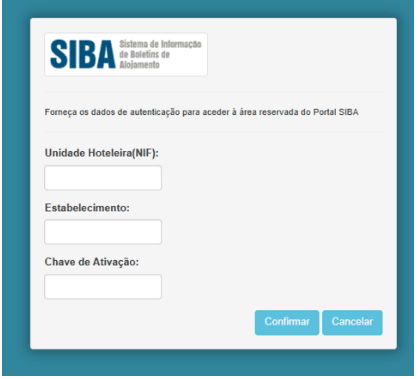
How to configure the Guest Online registration between Holidu and SIBA
Follow these steps to connect your SIBA account to Holidu:
Step 1: Access the Online Check-in Settings
Open your Holidu app and navigate to Tools in the left-side menu, then click on Online Check-in.

Step 2: Select Your Property
You will see a list of your properties. Click Configure next to the property you want to connect to SIBA.
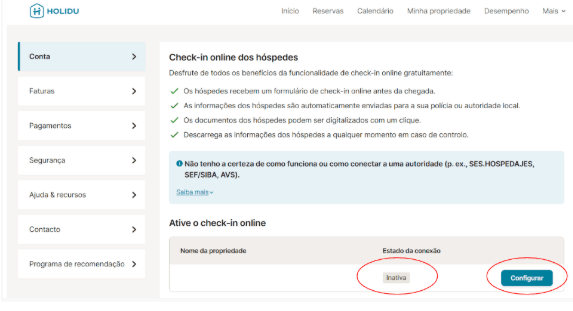
Step 3: Fill in Your SIBA Credentials
Complete the configuration form with your SIBA portal information and enable the option to send data automatically to the responsible authority.

Step 4: Select Your Submission Method
Choose the sending method that matches your SIBA account configuration. The two available options are:

Option A: SEF-SIBA Web Service Integration
This method uses your SIBA portal login credentials. Use the same username and password from https://siba.ssi.gov.pt/S/FB.aspx?ReturnUrl=%2fS%2fau%2fDefault.aspx
Map your credentials as follows:
| Field in Holidu | SIBA Portal Field |
|---|---|
| Username | Unidade Hoteleira (NIF of the hotel unit) |
| Password | Chave de Ativação (activation key) |
| Establishment number | Estabelecimento (establishment code) |
For the remaining fields (postal code, postal area, contact name, email, and phone number), enter the exact information from your SIBA account under Atualização dos dados de inscrição: https://siba.ssi.gov.pt/S/au/DadosIdentificacaoActualizacao.aspx
Verify that your Método de envio is set to Web Service in your SIBA account settings for this option to work correctly.
Option B: SEF-SIBA Página no Portal Integration
This method requires only your basic SIBA login credentials. Use the same username and password from https://siba.ssi.gov.pt/S/FB.aspx?ReturnUrl=%2fS%2fau%2fDefault.aspx
Map your credentials as follows:
| Field in Holidu | SIBA Portal Field |
|---|---|
| Username | Unidade Hoteleira (NIF) |
| Password | Chave de Ativação (activation key) |
| Establishment number | Estabelecimento (establishment code) |
No address or contact details are required for this option. Only select this method if it matches your current Método de envio in your SIBA account settings.
How to Switch Between Submission Methods
Your Holidu configuration must always match your SIBA account's Método de envio. To change methods:
- Check your current method in the SIBA portal under Atualização dos dados de inscrição
- Gather your NIF and all establishment numbers that need to be changed
- Email siba@ssi.gov.pt requesting a change to your preferred submission method
- Wait for SIBA's confirmation that the change has been processed
- Return to Holidu, select the matching submission method, and complete the required fields
- Click Validate and wait for the Completed status
- Click Save Changes to finalize the connection

What happens after the activation
Once your SIBA connection is active, guest registration begins automatically for eligible bookings. Here's what to expect:
- Future bookings with check-in dates at least 6 days after configuration is completed will include an online check-in form
- Guests automatically receive the form link via email or through their booking platform message
- Guest data is collected and securely stored in Holidu
- Data is automatically transmitted to the SIBA portal after 11:00 PM on the check-in date
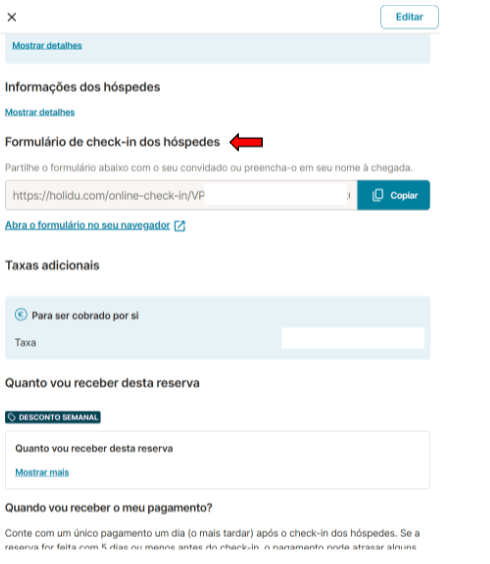
Guest's point of view
Your guests will have a straightforward experience completing their registration. After booking, they receive an email with a link to the guest registration form. Here's what they see:


Guests can complete the form by entering information manually or by scanning their ID documents. They must provide details for all guests, including children. If the form remains incomplete, guests receive automatic reminders 5 days before arrival. If still incomplete by check-in day, you can resend the link or manually complete the information during check-in. The critical deadline is 11:00 PM on the check-in date, after which data is submitted to SIBA.
Form Statuses
Track the status of your guest registrations directly in the booking details. Here are the most common statuses you will encounter:
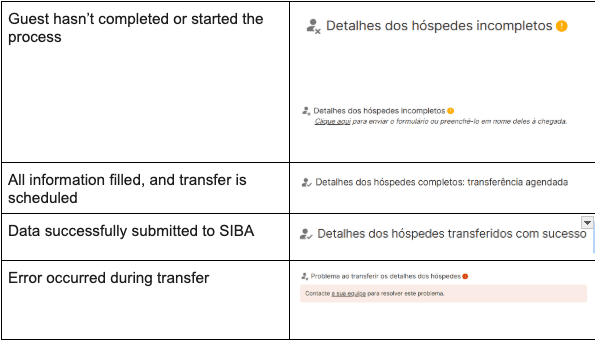
Common Statuses Explained
Pending: Form has not yet been completed by the guest. Reminders will be automatically sent.
Completed: Guest has submitted all required information successfully.
Submitted: Data has been transferred to the SIBA portal.
Error: There was an issue submitting the data. This typically occurs if your Holidu submission method doesn't match your SIBA account configuration.
How to Fix Incomplete or Failed Submissions
If you see an error status:
- Verify that the submission method selected in your Holidu app matches the Método de envio configured in your SIBA account
- Confirm you selected either SEF-SIBA web service integration or SEF-SIBA Página no portal integration correctly
- If the issue persists, resend the form link to the guest or contact Holidu Support at host@holidu.com
How to get the guest registration form - Boletim de alojamento
You can manually download and print the guest registration form (Boletim de alojamento) for offline use or backup purposes:
- Log into your Holidu account and navigate to More in the main menu
- Select Account, then choose Guest Online Registration
- Click Configure next to your property
- Open the Details section and select Documents
- Click Generate Guest Form
- Choose the date period you need the form for
- Click Download to save the PDF


Frequently Asked Questions
When do guests receive the form?
Guests receive the form link immediately after completing their booking via email or platform message. If the form remains incomplete 5 days before check-in, an automatic reminder is sent.
What about multi-unit properties?
The SIBA integration is not yet available for properties with multiple units, such as properties with separate rented rooms. Holidu is actively working to support this feature. Contact support for updates on availability.
What happens to bookings made before I activated SIBA with Holidu?
The online form will only be sent automatically if your SIBA configuration was completed at least 6 days before the check-in date. For earlier bookings, you must manually submit guest data to SIBA or use the downloadable form.
Do I need to register all guests, including minors?
Yes, all guests must be registered, including children and infants. Parents or legal guardians can enter information on behalf of minors.
What if guests don't fill out the form?
Guests receive an automatic reminder 5 days before check-in. If the form is still incomplete by check-in day, you can complete it yourself using the guest's information or by resending the link directly to them. Submission must occur before 11:00 PM on the check-in date.
Can I edit the form after submission?
No, once data is submitted to SIBA, it cannot be modified through Holidu. For corrections, you must contact the SIBA portal directly at https://siba.ssi.gov.pt/
Will I receive a notification when a guest completes the form?
Holidu does not currently send automatic notifications for form completion. You can verify completion status by checking the booking details in your Holidu app.
Can I use this configuration for all my bookings?
The SIBA integration works with bookings made through connected channels on Holidu. Manual bookings or calendar imports via iCal are not supported by this feature.
What if a guest completes their registration and then cancels the booking?
If a booking is cancelled, the guest data will not be transmitted to SIBA. Data transfers only occur for active bookings on the check-in date.
Do my secondary account collaborators have access to this feature?
Only your main account has permission to configure the SIBA connection. Collaborators can view the form status in booking details but cannot manage or activate the feature.
When exactly is guest data transferred to the SIBA portal?
Guest data is automatically transferred to SIBA after 11:00 PM on the check-in day. Ensure all guest information is completed before this deadline for successful submission.
What should I do if I have issues activating the SIBA connection?
If you encounter problems during setup, contact Holidu's support team at host@holidu.com. Provide details about your error and the submission method you selected so our team can assist quickly.
What if my username and password aren't working during configuration?
Double-check that you're using the same credentials you use to log into the SIBA portal at https://siba.ssi.gov.pt/S/FB.aspx?ReturnUrl=%2fS%2fau%2fDefault.aspx Ensure your keyboard's caps lock is not on and that there are no extra spaces. If issues persist, reset your SIBA password on the portal or contact SIBA support.
Can I configure SIBA for multiple properties?
Yes, you can configure SIBA for each of your properties individually. Repeat the configuration process for each property, ensuring that each has matching submission methods between Holidu and your SIBA account.
Is my guest's personal data secure?
Holidu transfers guest data directly to the official SIBA portal. All data transmission is encrypted and secure. Holidu complies with GDPR and Portuguese data protection regulations.
What if I need to update my
Do you want to contact us?
We’re here to help. You can contact us directly if you need assistance or have questions.
Contact us