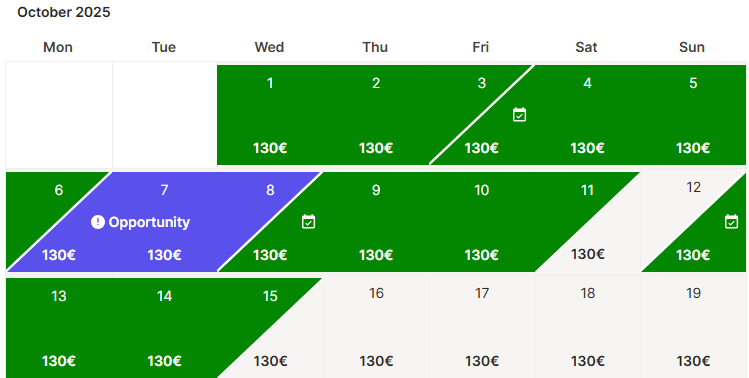
With Holidu's Flexible Stays feature, you can open up bookable nights between bookings — the gaps shown in purple on your calendar that wouldn't usually be bookable due to your minimum-stay rules or fixed check-in/out days. Activating Flexible Stays makes those nights available without changing your standard settings, helping you capture short-stay demand you'd otherwise miss.
How to Activate Flexible Stays
First, log in to your Holidu account and select the property you want to update. You can configure these settings from either the Discounts section or the Calendar section. The outcome will be the same.
From the Discounts Section
- Go to "Configuration" on the left-hand side, scroll down and click on "Discounts".
- Scroll down to the bottom of the page, where you'll find the Flexible Stays section, and click on "Configure".
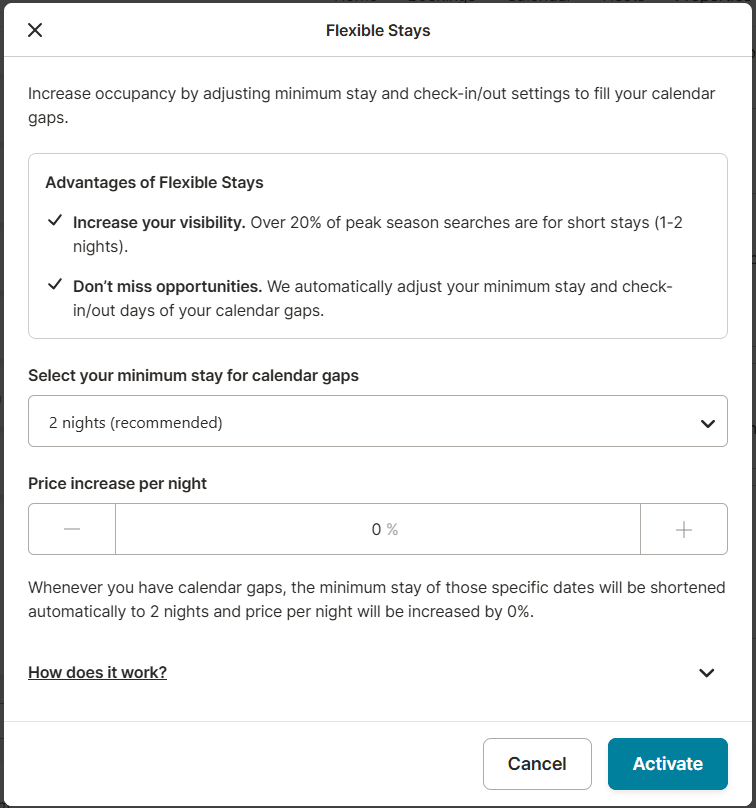
- Choose between 1, 2, or 3 nights minimum stay for the gap period and increase the price per night up to 50% over the price you currently set.
- Click on "Activate" to confirm the configuration.
From the Calendar Section
- Go to the calendar of your property and click on the purple indicator.
- Choose between 1, 2, or 3 nights minimum stay for the gap period and increase the price per night up to 50% over the price you currently set.
- Click on "Activate" to confirm the configuration.
What are the Benefits for You?
- More bookings: Short-stay nights become bookable during high-demand periods
- Better visibility: Over 20% of peak-season searches are for short stays
- More reviews: Every booking is another chance for guest feedback
- Higher ranking potential: Bookable gaps support your performance in search results
- Less manual work: No need to adjust your calendar by hand for each gap
Things to Keep in Mind
- The feature only affects calendar gaps where your current settings don't allow bookings.
- This setting overrides your current settings for minimum stays and short stays.
- Check-in and check-out will be possible on any day for these special nights.
- If a booking is made, the special pricing and stay rules apply only to that period.
- Flexible Stay bookings will appear tagged in your calendar for clarity.
- You can deactivate the feature anytime from the same menu.
Frequently Asked Questions
Can I exclude certain dates?
For now, activating Flexible Stays applies to all gap nights that match your settings. You can still manually block any dates you don't want to open.
Do guests see the purple gaps?
No. These are only visible to you, to highlight where bookings are being missed.
Can I change the setting later?
Yes. You can update or disable Flexible Stays at any time.
Do you want to contact us?
We’re here to help. You can contact us directly if you need assistance or have questions.
Contact us